git add --resolved: Stop Committing Conflict Markers
git add . silently stages leftover conflict markers and stray edits. Git 2.56 adds git add --resolved, which refuses. Lab output and an old-Git fix.
Resolve one of two conflicted files, type git add ., commit, and Git records <<<<<<< HEAD in your config file with exit code 0. Git 2.56 added git add --resolved, which stages only conflicted paths and refuses outright while any of them still holds a marker. Git 2.56.1 shipped on 10 November 2026 as a security release, so if you upgrade this week you get --resolved too. This lab runs both versions against the same broken merge.
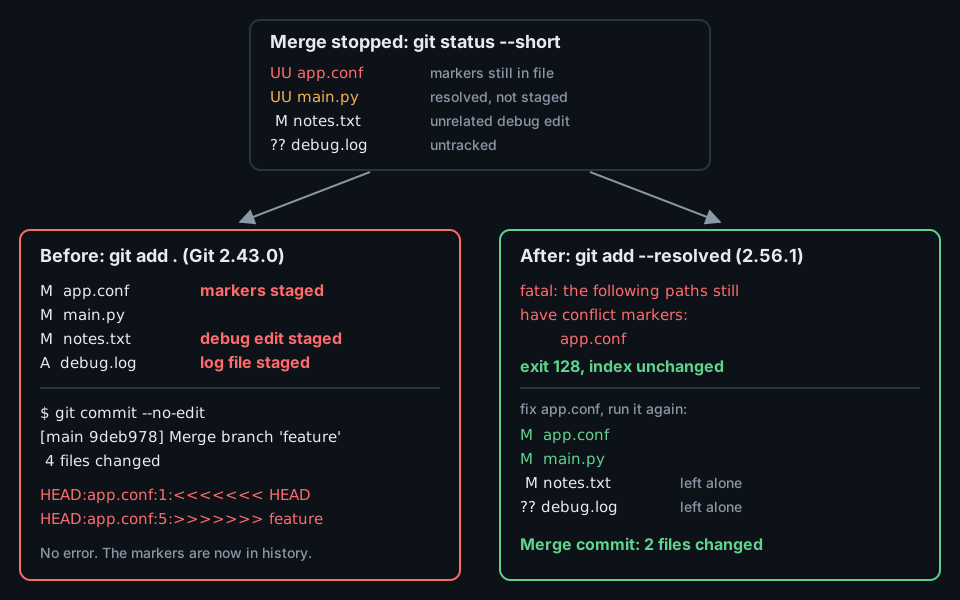
git add . commits the markers and the noise; git add --resolved blocks, then stages only the conflict. Source: sandbox run with Git 2.43.0 and 2.56.1.The lab setup
Two branches change the same lines in app.conf and main.py, so git merge feature stops with both files unmerged. While the merge is open, a debug line goes into notes.txt and a debug.log file appears, the kind of noise any working tree collects. Then only main.py gets resolved:
$ git status --short
UU app.conf
UU main.py
 M notes.txt
?? debug.log

$ cat app.conf
<<<<<<< HEAD
timeout_ms = 800
=======
timeout_ms = 2000
>>>>>>> feature
retries = 2
Git 2.56.1 was built from the kernel.org tarball (SHA-256 checked against sha256sums.asc). Git 2.43.0 is the Ubuntu package already in the sandbox.
Before: what git add . commits
Running the common habit on Git 2.43.0:
$ git add .
$ git status --short
M  app.conf
A  debug.log
M  main.py
M  notes.txt
$ git commit --no-edit
[main 9deb978] Merge branch 'feature'
$ git show --stat --format='%h %s' HEAD
9deb978 Merge branch 'feature'

 app.conf  | 4 ++++
 debug.log | 1 +
 main.py   | 2 +-
 notes.txt | 1 +
 4 files changed, 7 insertions(+), 1 deletion(-)
$ git grep -n -e '^<<<<<<<' -e '^>>>>>>>' HEAD -- .
HEAD:app.conf:1:<<<<<<< HEAD
HEAD:app.conf:5:>>>>>>> feature
No warning at any step. Staging a file is how Git learns a conflict is resolved, so git add on a file full of markers marks it resolved. The merge commit now carries a broken config, a debug edit, and a log file.
git add -u is only slightly better. It skipped the untracked debug.log but still staged the markers and notes.txt. Running git add . on Git 2.56.1 stages all four paths exactly like 2.43.0: the old commands did not change.
After: git add –resolved on Git 2.56.1
The git-add manual defines the new option:
Update the index for unmerged paths matching <pathspec> where no conflict markers remain in the working tree. Unmerged paths without conflict markers (including binary files and file deletions) are staged as resolved, while any path with leftover conflict markers causes the command to refuse to stage any files.
Same repo state, new command:
$ git --version
git version 2.56.1
$ git add --resolved
fatal: the following paths still have conflict markers:
	app.conf

$ echo $?
128
$ git status --short
UU app.conf
UU main.py
 M notes.txt
?? debug.log
Nothing was staged, not even the correctly resolved main.py. After fixing app.conf, the same command stages the two conflicted files and nothing else:
$ git add --resolved
$ git status --short
M  app.conf
M  main.py
 M notes.txt
?? debug.log
$ git commit --no-edit
[main dcfb240] Merge branch 'feature'
$ git show --stat --format='%h %s' HEAD
dcfb240 Merge branch 'feature'

 app.conf | 2 +-
 main.py  | 2 +-
 2 files changed, 2 insertions(+), 2 deletions(-)
The debug edit and the log file stay in the working tree, outside the merge commit.
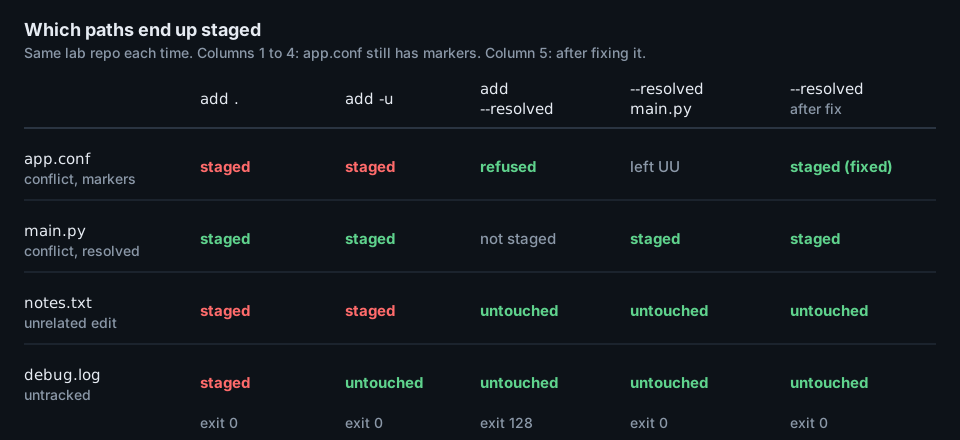
--resolved columns avoid all of them. Source: sandbox run with Git 2.56.1 and 2.43.0.The pathspec is the blast radius
The check is all-or-nothing within the paths you select. With app.conf still broken, a pathspec narrows the check to one file:
$ git add --resolved main.py
$ git status --short
UU app.conf
M  main.py
 M notes.txt
?? debug.log
That is useful in a large merge: stage the files you finished and keep working. The option also refuses to mix with the broad forms:
$ git add -u --resolved
fatal: options '-u/--update' and '--resolved' cannot be used together
How Git decides a line is a marker
The check lives in has_conflict_markers() in merge-ll.c. It reads each unmerged regular file line by line and stops at the first marker or the first binary-looking line. A marker line is N copies of <, =, > or |, followed by whitespace, where N is the conflict-marker-size attribute (default 7). < and > markers need a space after them.
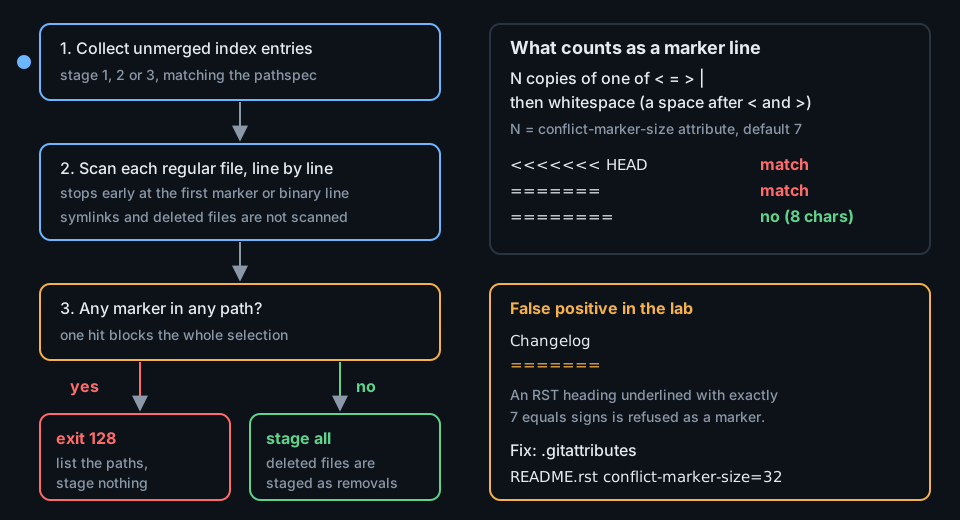
======= heading underline trips the same rule. Source: merge-ll.c and builtin/add.c at v2.56.1.That rule has a false positive. reStructuredText and setext Markdown headings use a line of = signs. If the underline is exactly seven characters, --resolved treats it as a marker. In the lab, a conflicted README.rst resolved to this content was refused:
$ cat README.rst
Changelog
=======

v2 merged
$ git add --resolved
fatal: the following paths still have conflict markers:
	README.rst
The gitattributes manual documents conflict-marker-size for files that need longer markers. Setting it for that file made the same command pass:
$ echo 'README.rst conflict-marker-size=32' > .gitattributes
$ git add --resolved
$ git status --short
M  README.rst
?? .gitattributes
The attribute also makes future merges of that file write 32-character markers, which is the point of it. A plain git add README.rst works as well, but skips the check for that file.
On Git older than 2.56
git diff --check already knows about leftover markers. Its documentation says it will “Warn if changes introduce conflict markers or whitespace errors” and exit non-zero. On Git 2.43.0, a two-line pre-commit hook blocked the same bad merge commit:
#!/bin/sh
exec git diff --cached --check
$ git add .
$ git commit --no-edit
app.conf:1: leftover conflict marker
app.conf:3: leftover conflict marker
app.conf:5: leftover conflict marker
$ echo $?
1Two limits. The hook also fails on trailing whitespace, as defined by core.whitespace, which may be noisier than you want. And it does nothing about notes.txt and debug.log, which git add . still staged. --resolved fixes both problems at the staging step instead of the commit step.
What to do
- Check your version with
git --version. Git 2.56.1 is the newest release on kernel.org as of 13 November 2026 and carries the security fixes from 10 November 2026. - During merges, rebases, and cherry-picks, replace
git add .andgit add -uwithgit add --resolved. Usegit add --resolved <path>to stage finished files in a large conflict. - Add an alias so the habit sticks:
git config --global alias.ar 'add --resolved'. - If your repo has RST or Markdown files with seven-character
=======underlines, setconflict-marker-sizefor them in.gitattributes, or lengthen the underline. - For machines stuck on older Git, install the
git diff --cached --checkpre-commit hook, and add the same check to CI so a marker that slips through still fails the build. - Search history for markers that already landed:
git grep -n -e '^<<<<<<< ' -e '^>>>>>>> ' HEAD.